All Files.
Kept Private.
Open a whole folder and view photos, documents, drawings, and video right there.
Files never leave your browser.
Just drop a file anywhere on this page and we'll suggest the right tool
Runs in your browser · No data stored · Open web standards
- File Viewer205 formats, a whole folder at a time — photos, documents, drawings, videoFlagship · 205 extensions
- ImagesView HEIC, PSD, RAW; convert, resize, remove background, watermark18 tools
- PDFMerge, split, compress, unlock, sign, edit text19 tools
- VideoPlay MKV, AVI, RMVB; convert, trim, GIF, transcribe12 tools
- AudioPlay WMA, APE; convert, merge, equalizer, vocal remover7 tools
- DocumentsView and edit Word, Excel, PowerPoint, HWP; find and replace8 tools
Flagship tool
File Viewer — one folder, everything in view
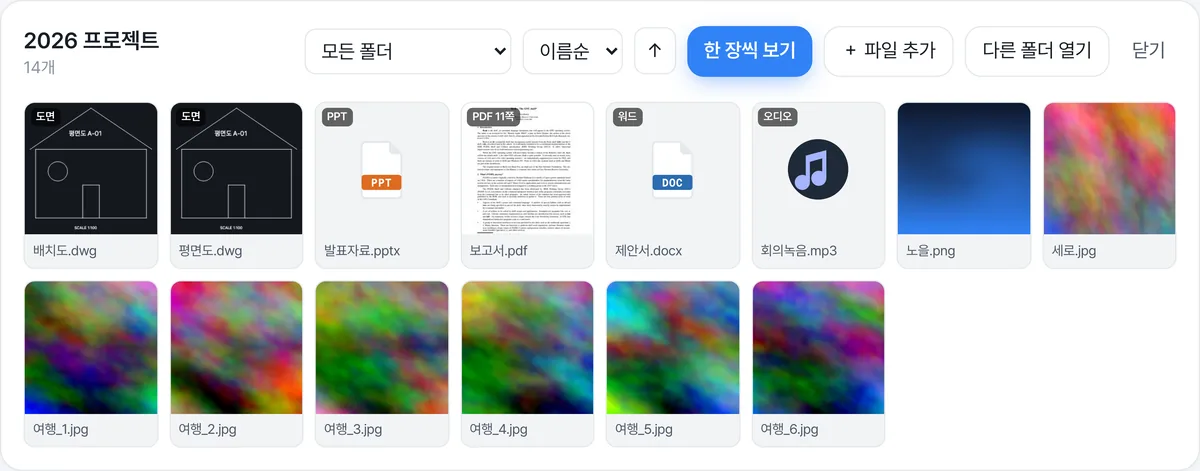
Point it at a folder and skim photos, RAW, HEIC, PDF, HWP, Word, Excel, PowerPoint, CAD drawings, video, and audio in one grid, then flip through them one by one. Nothing to install, nothing to upload.
- JPG · PNG · WebP · HEIC
- Camera RAW
- PDF · HWP
- Word · Excel · PPT
- DWG · DXF drawings
- MP4 · MOV video
- MP3 · WAV
A whole folder in a grid
Reads subfolders in one go; sort by name, date, or size and filter by folder.
No upload
Your browser reads files on your device. Zero bytes go to a server.
Everything you need to look
Zoom, rotate, slideshow, full screen; page through PDF and HWP; drawings stay crisp as vectors.
Why FileKeeps
We don’t trade your privacy for convenience
Data that never leaves
Neither your files nor your conversations leave the browser. Processing and storage both happen on your device — data sovereignty, enforced by code.
AI that runs on your device
WebGPU and WASM run modern models right inside this tab. No server round trips — and once the model is downloaded, it works offline too.
Every file, one studio
Analyze, convert, and recover PDFs, images, audio, video, and documents in one place. No hopping between tools.
Start instantly
No downloads, no sign-up. All you need is a browser address bar — you can start right now.
Why it matters
Nothing uploaded, nothing to leak
Most AI tools process your files by uploading them to a server. Convenient — but at that moment your file is copied onto third-party infrastructure. FileKeeps flips the approach: the model comes to your browser, so there is no data to send in the first place. The ‘minimal collection’ that privacy law demands is satisfied by not collecting anything at all.
The moment you upload, the risk begins
Upload-based AI vs. on-device processing
Upload-based AI
Files sent to the cloud
Data transfer = more risk
Leaks, retention, third-party sharing
On-device
Processed safely on your device
No transfer = the safe choice
Easier PIPA and GDPR compliance
| Typical cloud AI | FileKeeps | |
|---|---|---|
| File upload | Sent to a server | Never sent |
| Server storage | Possible | None |
| Offline use | Not possible | Works once the model is cached |
| Account | Required | Not needed |
How it works
Simple. Secure.
Pick a file
Files are read into browser memory only
Runs on your device
WebGPU · WASM execute inside this tab
Save the result
Results download straight from your device
☁ Cloud upload
✕ None
Exception: in environments where local AI cannot start (e.g. browsers without WebGPU), the text of that request is sent to Cloudflare Workers AI only with your consent, and it is not stored on the server.
Tools
Every file tool, in one place
Documents
Images
Audio · Video
Work with your files safely, right now
No install, no account. Start right in your browser and keep the results on your device only.