Guides
Guides
Practical guides on handling your files safely in the browser. Every article links straight to the actual tool.
Resize an Image to Exact Pixels — Set the Width and Height You Need
How to fit a photo to a required pixel size — ID photo specs, shop thumbnails, upload limits. Shrink without distortion using the ratio lock, and handle specs like 300×400 with crop plus resize. In the browser, no upload.

How to Create a QR Code That Never Expires (Free, Print-Ready)
Turn a link or text into a QR code. It's a static QR — the content lives in the code itself — so it never expires, and what you type is never sent to a server.
How to Convert iPhone HEIC Photos to JPG (When They Won't Open on Windows)
iPhone photos arriving as HEIC and refusing to open? Convert them to JPG or PNG — dozens at once, inside your browser, without uploading them anywhere.
How to Make an ID Photo from a Selfie — Sized and Background-Ready
Turn a phone photo into a properly sized ID photo — background removed and replaced with a standard color, cropped to spec, and your face photo never leaves your device.
How to Make a Korean Name Stamp (Dojang) Image — Transparent PNG
Create a traditional-style name stamp image for documents — Korean or Hanja characters, six typefaces, round or square, with a realistic ink texture. Saved as a transparent PNG.
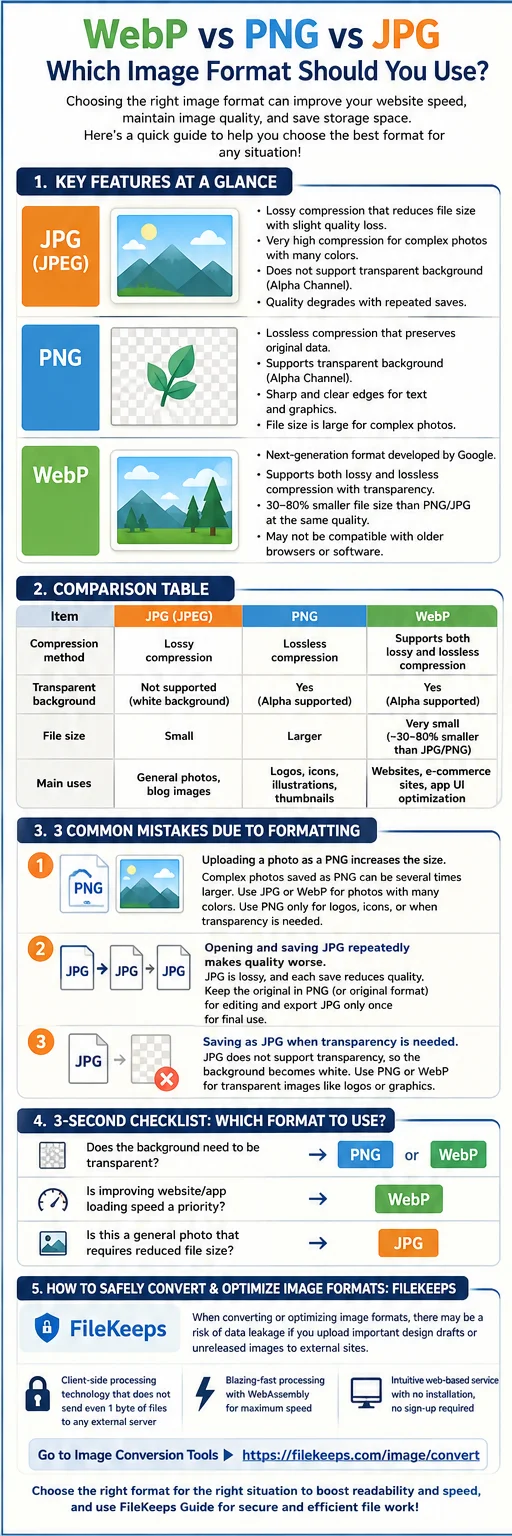
The Complete Guide to Image Formats: WebP, PNG, and JPG Differences and How to Use Each in Practice
How the three main web image formats differ and how to pick the best one for each situation—plus a way to convert them right in your browser.
How to Remove an Image Background — With AI, In Your Browser, No Upload
How to remove the background from portrait or product photos with AI and save them as transparent PNGs — processed inside your browser, with no upload.
Convert Dozens of Images at Once (as a ZIP, In Your Browser)
How to convert many images to another format at once, shrink their size, and download them as a ZIP — with parallel processing and resume, all inside the browser.