Why Businesses Should Consider Local AI Over Cloud AI in 2026
Why on-device AI is emerging as an alternative for data control, cost, latency, and compliance—along with its honest limitations.
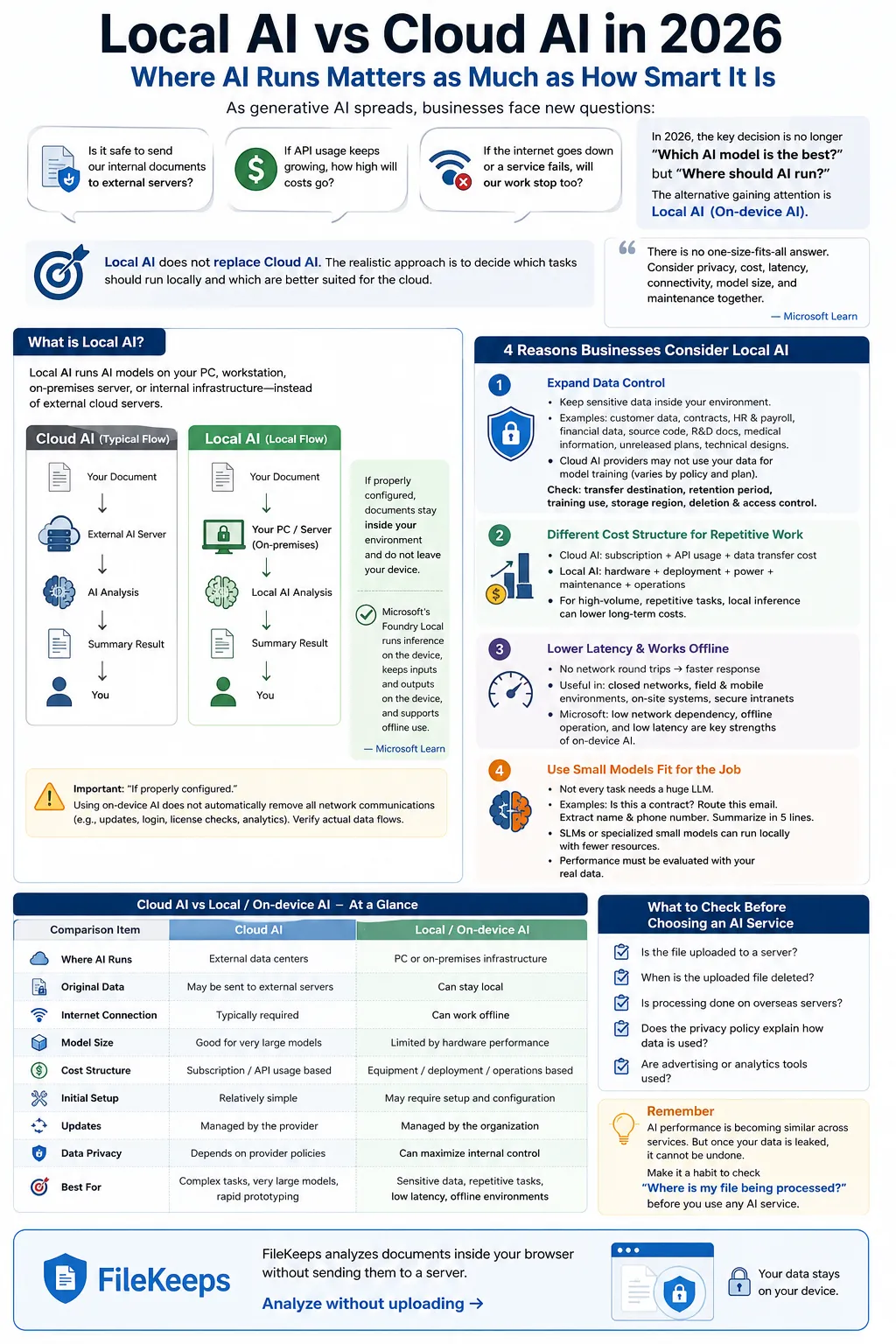
With the rapid spread of generative AI like ChatGPT and Claude, the way enterprises utilize AI has also changed dramatically. In the early days, most started with cloud AI. This is because there is no need to build a separate AI server, and powerful models can be used immediately simply by connecting via an API. However, as AI began to be deeply applied to actual business operations, new questions started to arise.
"Is it really okay to send internal company documents to an external server?"
"If API usage keeps increasing, how high will the costs go?"
"Won't our business operations grind to a halt if the internet goes down or an external service experiences an outage?"
That is why in 2026, rather than simply asking, "Which AI model has the best performance?", "Where should the AI be executed?" has become one of the most critical technology decision-making factors.
The alternatives gaining attention as a result are Local AI and **On-device AI**.
Local AI does not replace all cloud AI. Rather, from a business perspective, distinguishing which tasks to process locally and which to leave to the cloud is a much more realistic approach.
Microsoft also explains that neither local nor cloud AI is universally superior; instead, factors such as data privacy, cost, latency, connectivity, model size, and maintenance must be considered together. (Microsoft Learn)
What is Local AI?
Local AI is an approach where AI models are executed directly on the user's PC, workstation, company server, or on-premises environment rather than on an external cloud server. For example, let's think about summarizing a company contract using AI. A typical cloud AI operates roughly as follows:
Contract
  ↓
External AI Server
  ↓
AI Analysis
  ↓
Summary Result
  ↓
User
With Local AI, the processing location changes.
Contract
  ↓
Internal PC / Server
  ↓
Local AI Analysis
  ↓
Summary Result
If configured properly, you can perform the task without transmitting the document contents themselves to an external inference server. In fact, Microsoft's latest local AI environment, Foundry Local, is designed so that model inference is performed on the user's device, inputs and outputs never leave the device, and offline execution is possible. (Microsoft Learn) However, the important expression here is "if configured properly." Just because you use on-device AI does not mean that all network communications—such as checking for program updates, logging in, license verification, and analytics tools—automatically disappear. Therefore, the actual data flow must be checked on a service-by-service basis.
4 Reasons Why Enterprises Consider Local AI
1. Broader Scope of Data Control
The most direct reason enterprises consider Local AI is data control. The data handled within a company contains more sensitive information than you might think. Examples include:
- Customer personal information
- Contracts
- Payroll and HR materials
- Internal financial data
- Source code
- R&D documents
- Healthcare-related information
- Undisclosed business plans
- Technical design materials
When using cloud AI, the necessary data is generally transmitted via the network to the infrastructure of an external service provider. On the other hand, by placing AI inference in a local environment, you can process sensitive raw data while keeping it inside the company. Microsoft also cites the ability for data to stay on the device as one of the advantages of on-device AI. (Microsoft Learn) However, one misconception should be avoided. Just because you send data to cloud AI does not mean that data is necessarily used to train the AI. Data usage policies vary depending on the provider and pricing plan. For example, OpenAI states that inputs and outputs from business products such as ChatGPT Business, Enterprise, and the API are currently not used to train models by default. (OpenAI Help Center) Therefore, what enterprises need to check is simply not:
"Is it the cloud?"
but rather items such as the following:
Where is the data transmitted?
        ↓
How long is it retained?
        ↓
Is it used for model training?
        ↓
Which country or region is it stored in?
        ↓
What are the deletion and access control policies?
Local AI is meaningful in that it is an option that can reduce external transmission itself.
2. Cost Structures Can Change for Repetitive Tasks
Cloud AI costs are typically tied to subscription fees or API usage. Especially when developing API-based services, costs can increase depending on the number of requests, input/output tokens, and the model used. When user volume is low, this may not be a major issue. However, the story changes if the operation is repeated thousands of times a day. For example, suppose the following processing continuously occurs internally within a company:
Daily PDF analysis          5,000 cases
Email classification        20,000 cases
Document PI detection       10,000 cases
OCR processing              30,000 cases
If you call an external API for each task, API costs are likely to grow right along with your workload. With Local AI, instead of per-item API fees, companies generally utilize the CPU, GPU, or NPU resources they already own. Microsoft's Foundry Local also highlights the absence of separate per-token costs as a feature of local inference. (Microsoft Learn) However, you should not assume that "Local AI is free" here either. There are costs associated with the local environment as well:
- Purchasing GPUs or AI PCs
- Server setup
- Power consumption
- Model deployment
- Version updates
- Security management
- Operations personnel
- Incident response
Therefore, enterprises will find it more accurate to compare TCO (Total Cost of Ownership) rather than simple API prices.
Cloud AI Cost
=
Subscription fees
+ API usage fees
+ Data transfer and other service costs
On the other hand, Local AI has roughly the following structure:
Local AI Cost
=
Hardware
+ Setup
+ Power
+ Maintenance
+ Operations
Which one is cheaper depends on usage volume and business characteristics. In particular, the more repetitive high-volume processing there is, the stronger the rationale for reviewing local inference becomes.
3. Reduced Network Latency and Offline Usability
With cloud AI, data inherently travels across the network.
User
 ↓
Internet
 ↓
AI Server
 ↓
Internet
 ↓
User
Consequently, network conditions and the status of external services can affect response times. Because inference happens on a PC or on-premise equipment in Local AI, no network round-trip time is required. Therefore, using appropriate hardware and a sufficiently small model can yield advantages in tasks requiring fast response speeds. Microsoft's current on-device AI documentation also describes low network dependency, offline operation, and low latency as key features. (Microsoft Learn) The difference becomes even more pronounced in environments such as the following:
Air-gapped Networks
Manufacturing facilities or research institutes where external internet connectivity is restricted.
Business Travel and Mobile Environments
Environments where the network is not always stable.
Edge Systems
Inspection equipment or industrial PCs that require immediate AI processing.
Internal Security Networks
Organizations that restrict external SaaS access altogether. In such places, whether it can continue to be used without an external connection can be a more crucial condition than the AI's peak performance.
4. Ability to Use Small Models Tailored to Specific Tasks
When people think of generative AI, they typically think of massive LLMs first. However, ultra-large models are not necessary for every single corporate task. For instance, consider tasks like these:
Is this document a contract?
Which department should this email be routed to?
Find names and phone numbers in the document.
Summarize the meeting minutes in five lines.
You do not always need to use the largest model for such tasks. Choosing an SLM (Small Language Model) or a small specialized model suited for a specific task allows you to run it locally with relatively modest resources. However, even here, you cannot say:
"Small specialized models are always more accurate than large models."
The accurate phrasing is closer to this:
If the scope of the task is clear, a small model can be a sufficiently good choice in terms of cost and speed.
And actual performance must always be evaluated using the company's real data.
Cloud AI vs. Local AI Comparison
A brief comparison of the two approaches is as follows:
| Comparison Item | Cloud AI | Local & On-device AI |
|---|---|---|
| AI Execution Location | External data center | PC or internal enterprise infrastructure |
| Raw Data | Can be transmitted to external servers | Can be kept locally |
| Internet | Generally required | Offline configuration possible |
| Model Scale | Advantageous for using large models | Heavily influenced by hardware performance |
| Cost Structure | Centered on subscription & API usage | Centered on hardware, setup, & ops costs |
| Initial Setup | Relatively simple | Setup work may be required |
| Updates | Managed by service provider | Can be managed directly by the enterprise |
| Latency | Affected by network | No network round-trip for local processing |
| Data Control | Provider policies & contracts are important | Scope of internal enterprise control can expand |
| Scalability | Very high | Affected by hardware capacity |
Microsoft also recommends comparing privacy, resources, cost, maintenance, latency, scalability, connectivity, and model size together when choosing between local and cloud in its official developer documentation. (Microsoft Learn)
Tasks Well Suited for Local AI
Which tasks are good candidates to move to local processing? Generally, tasks such as the following can be candidates:
Sensitive Document Processing
Documents containing contracts, medical records, HR materials, customer personal information, and more.
Repetitive Document Summarization
Tasks that continuously summarize large volumes of documents in a uniform manner.
Document Classification
Work that automatically classifies documents by type.
Personal Information Detection and Masking
Tasks that find and remove names, phone numbers, email addresses, etc., from documents.
OCR
Tasks that extract text from scanned documents or images.
Speech Recognition
Converting internal meeting recordings or on-site audio into text.
Network-Restricted Environments
Factories, research institutes, air-gapped networks, mobile systems, etc. They share a common trait: The scope of the work is relatively clear, and there is data that you do not want to send externally.
Conversely, Cases Where Cloud AI Is Better
Local AI is not the answer to every problem. There are also many tasks where the cloud approach is far more realistic.
Cases Requiring Very Large Models
Large models can be advantageous for tasks requiring complex reasoning and long context understanding. Running such models on a personal PC requires substantial GPU memory and computational performance.
Cases Requiring Up-to-Date Information
If you need to connect with real-time searches or the latest data, cloud services are often convenient.
Complex AI Agents
When multiple APIs, databases, search systems, and AI models need to be connected simultaneously, a cloud environment can be easier to build.
Services with Extremely High Usage Fluctuations
For a service that has 100 users yesterday but suddenly receives 100,000 users today, the scalability of the cloud is a significant advantage.
Cases Where User Device Performance Is Low
Not every PC is equipped with a high-performance GPU or NPU. On older PCs or low-spec terminals, the processing speed of local AI may not be satisfactory.
The Realistic Answer May Be Hybrid AI
In actual corporate environments, there is no need to choose strictly between local and cloud. Instead, Hybrid AI is often the most realistic approach. For example, let's think about analyzing customer consultation records. The raw data contains personal information. First, personal information is removed locally.
Raw Consultation Records
      ↓
   Local AI
      ↓
Mask Names, Phone Numbers, Addresses
Next, only the content with personal information removed is sent to a high-performance model in the cloud.
De-identified Data
      ↓
   Cloud LLM
      ↓
Advanced Summary & Analysis
The overall structure looks like this:
Sensitive Raw Data
        ↓
    Local AI
        ↓
Classify · Extract · Mask
        ↓
Transmit Only Necessary Information
        ↓
   Cloud AI
        ↓
Advanced Reasoning · Search · Reports
Configuring it this way allows you to leverage both the data control advantages of local AI and the high model performance of cloud AI. Microsoft also suggests an approach that considers the characteristics of each environment rather than viewing either local or cloud as an absolute answer in enterprise AI. (Microsoft Learn)
Why Is Local AI Advantageous from a Regulatory Perspective?
When discussing regulations, phrasing must be used with care. Using Local AI does not automatically ensure compliance with GDPR or personal information protection regulations. Even if personal information is processed within the company, obligations such as collection purposes, access rights, retention periods, and deletion policies may still remain. However, configuring systems to prevent data from being transferred externally or overseas can help reduce the data transfer paths that need to be reviewed. In the EU, when personal information is transferred outside the EEA, appropriate transfer mechanisms and safeguards such as adequacy decisions, Standard Contractual Clauses (SCCs), or Binding Corporate Rules (BCRs) may need to be examined. (European Commission) In other words, the regulatory advantage of local AI is closer to:
"Simplifying data governance by reducing unnecessary external data movement,"
rather than:
"Regs disappear when you use Local AI."
How to Verify If It Is 'True Local AI'
Just because a product description says Local AI, On-device AI, or Privacy AI does not mean you should assume files are never transmitted externally.
It is also a good idea to verify the actual behavior.
1. Internet Connection May Be Required Initially
On-device AI often requires downloading the AI model when first executed. When the model size is hundreds of megabytes or several gigabytes, network communication is inevitably required for the initial download or updates. Therefore, checking whether it operates offline after the initial setup is complete is a key verification step.
2. Monitor Network Traffic
You can monitor actual network packets using tools like Wireshark or built-in OS network monitors to see if data is being sent to external servers during AI processing. If traffic spikes toward external endpoints every time you enter a prompt, it is operating via a cloud API rather than locally—regardless of the marketing terminology.
Conclusion
The choice between cloud AI and local AI is no longer a simple debate over which technology is superior. It is an architectural decision regarding where to process data and how to balance control, cost, and performance.
- If you need maximum performance, complex reasoning, and high scalability, Cloud AI remains a powerful tool.
- If you need strict data containment, predictable operating costs for repetitive tasks, low latency, and offline capabilities, Local AI becomes a strong alternative.
In 2026, the most competitive enterprises are likely not those that chose just one side, but those that designed a Hybrid AI architecture tailored to their specific business needs and data characteristics.