Creating Your Own Claude Skills: An Introduction to skill-creator and mcp-builder
Learn how to bundle repetitive tasks into Claude skills, create skills using the official skill-creator, and connect external tools with mcp-builder.
If you find yourself explaining the same work procedures to Claude over and over again, it might be time to turn those instructions into a Skill.
When using AI for work, there comes a point where you constantly repeat similar prompts. For example, every time you write a report, you paste something like this:
First, summarize the core points in 5 lines or less.
Next, organize important metrics into a table.
Separate the problems and next actions distinctly.
Do not write sentences that are too long.
You type the exact same thing next week. And again the week after. At this point, it is closer to an operations manual than a simple prompt.
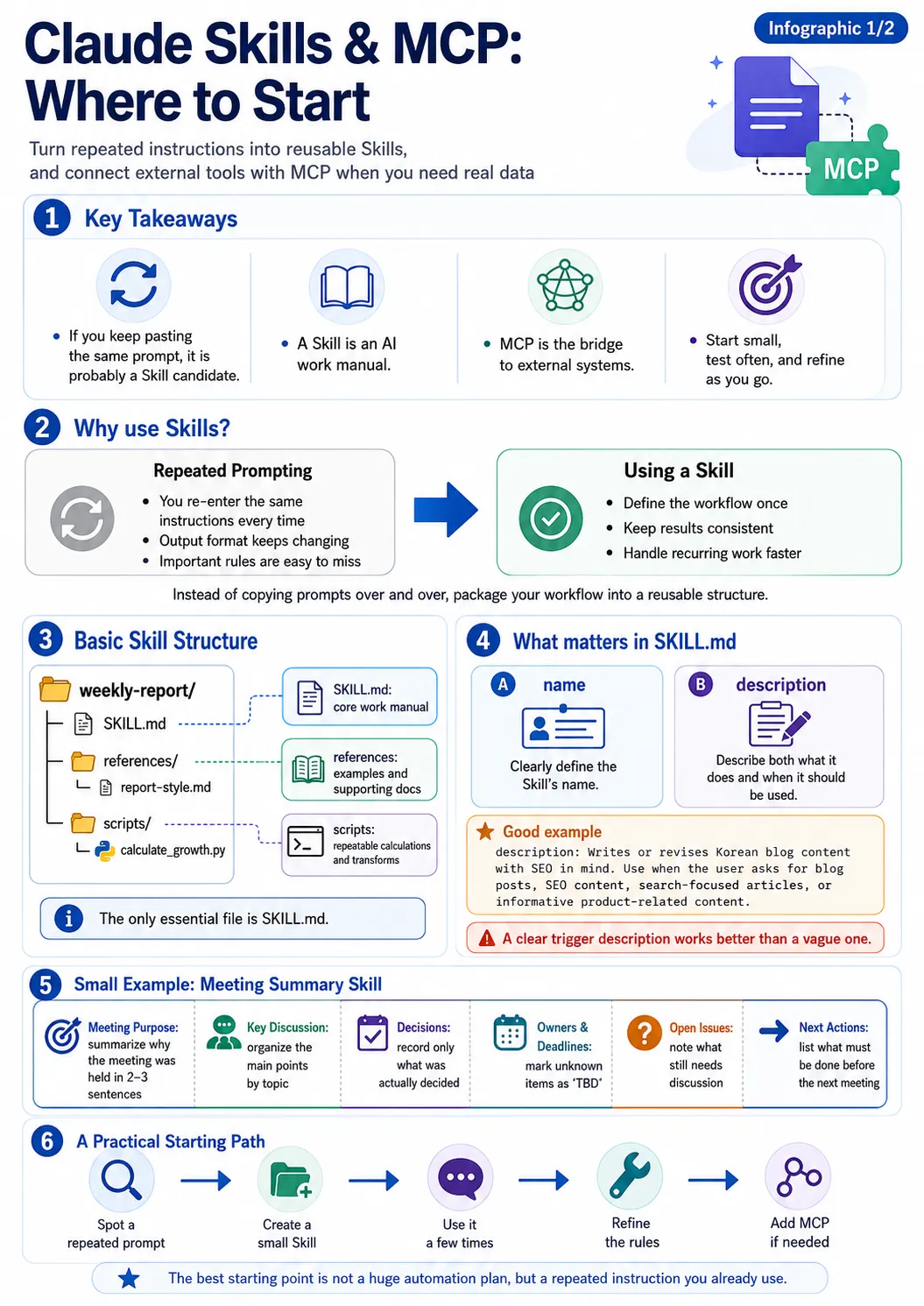
Claude Skills allow you to bundle these repeatedly used work methods and rules into a single reusable format. Anthropic's official Skills repository also describes a Skill as a folder containing instructions, scripts, and resources that teach Claude to perform specific tasks repeatedly. Each Skill requires a SKILL.md file, where you can write its name, description, and actual task instructions. (GitHub)
A Skill Is Simpler Than You Think
When you first hear the term Claude Skill, it might sound like you need to build a complex plugin or a separate AI model.
In reality, the basic structure is much simpler.
A single folder becomes a single Skill.
For instance, if you create a Skill for writing weekly reports, the structure might look like this:
weekly-report/
├── SKILL.md
├── references/
│   └── report-style.md
└── scripts/
    └── calculate_growth.py
The essential core file required here is SKILL.md.
If you need additional materials, you can put documents in references, and if there are repetitive calculation or conversion tasks to execute, you can place them in scripts. Anthropic's current Skill-authoring guide also adopts this structure—making SKILL.md mandatory while optionally adding resources like scripts, references, and assets. (GitHub)
To put it simply:
SKILL.md is the work manual, references are the reference materials, and scripts are the tools that handle repetitive tasks.
The Most Important File: SKILL.md
For a simple Skill, you can start with just a single SKILL.md.
Let's make a Skill that writes blog drafts in a consistent format, for example:
---
name: seo-blog-writer
description: Writes Korean blog posts optimized for SEO. Use this when the user requests to write or edit blog posts, search-exposure content, SEO content, or product-related informative articles.
---

# SEO Blog Writer

Follow these principles when writing blog posts:

- Naturally include core search keywords in the title.
- Present the problem the reader is curious about at the very beginning.
- Use H2 and H3 headings to organize sections.
- Avoid forcing repetitive keywords.
- Explain technical terms simply the first time they appear.
- Include real-life use cases whenever possible.
- Prioritize delivering information over promotional copy.
- Write sentences as naturally as if written by a human.

## Basic Structure

1. Problem Statement
2. Concept Explanation
3. Real-World Case
4. Pros and Limitations
5. Conclusion
Creating just this much makes a small Skill.
There is a particularly crucial part here:
the description.
Why the Description Matters in a Skill
Unlike a human who looks at a list of Skills to choose what they need, Claude compares user requests with Skill descriptions to determine which Skill is required. Therefore, writing something vague like this:
description: A skill for writing blogs
makes it difficult to understand in which situations it should be used. On the other hand, writing it like this is much clearer:
description: Writes or edits Korean blog content optimized for SEO. Use this when the user requests blog posts, SEO content, search-exposure writing, or product-explanatory content.
---
It is important to write down not only what it does, but also when it should be used.
Anthropic's skill-creator guide also highlights the description as the core mechanism for deciding whether a Skill is invoked, and recommends including both what it does and when it should be used. (GitHub)
skill-creator — The Skill That Creates Skills
An interesting tool appears here: skill-creator. Just as the name suggests, it is:
A Skill used to create Skills.
You can manually design the folder structure and SKILL.md from scratch, but if you are making a Skill for the first time, starting with skill-creator makes it much easier to understand.
Anthropic's official skill-creator is designed to support not only generating new Skills but also modifying existing ones, testing, evaluating performance, and improving triggers. The current official guide suggests an iterative process of drafting, running real test prompts, evaluating the results, and then refining the Skill. (GitHub)
For example, you can make a request like this:
I want to make a Skill for my weekly project reports.
The report must always use the following structure:

1. This week's progress
2. Completed tasks
3. Current issues
4. To-dos by assignee
5. Next week's plan

Please format the report in Markdown.
Instead of simply creating a single prompt, this helps you develop it into a Skill format by organizing details such as:
- What is the purpose of the Skill?
- When should it be executed?
- What is the output format?
- What examples should be included?
- Are separate reference materials needed?
You Don’t Need to Build a Massive Skill From the Start
When you first encounter Skills, it is easy to get greedy. For example, you might want to build a Skill like this:
A Skill that handles all company work
And try to cram everything into it:
- Report writing
- Customer support
- Translation
- Blogging
- Data analysis
- Code reviews
However, building it this way complicates the rules and makes it ambiguous which guidelines should apply in a given situation. It is better to start small. For instance, if you frequently use this sentence:
Always summarize the core points in three lines at the very beginning.
You can develop just that rule into a small work flow. Alternatively, you can pick a single repetitive task, such as:
Always organize meeting minutes in the order of decisions, assignees, and deadlines.
If there is a prompt you frequently copy and paste, that is the best candidate for a Skill.
Practical Example — Creating a Meeting Summary Skill
Suppose you often have to organize meeting transcripts. You create a single folder:
meeting-summary/
└── SKILL.md
And write the SKILL.md:
---
name: meeting-summary
description: Organizes meeting contents or transcripts. Use this when the user requests meeting notes, meeting content, meeting transcripts, or meeting summaries.
---

# Meeting Summary

Organize meeting contents in the following order:

## Meeting Purpose

Summarize the reason the meeting was held in 2-3 sentences.

## Key Discussions

Organize important discussions by topic.

## Decisions

Write down only what was actually decided.
Do not confuse items under discussion with finalized decisions.

## Assignees and Deadlines

| Task | Assignee | Deadline |
|---|---|---|

If an assignee or date cannot be confirmed, do not guess; mark it as `TBD`.

## Remaining Issues

Write down items that require further discussion.

## Next Actions

Organize tasks that need to be completed before the next meeting.
Now, you no longer need to repeatedly write out long instructions for every meeting. Even if the input meeting content changes every time, keeping the formatting method consistent is the purpose of this Skill.
What Then Is mcp-builder?
Once you understand Skills, the next concept that frequently appears is MCP (Model Context Protocol). At first glance, Skills and MCP might look similar. However, their roles are quite distinct. Using a simple analogy:
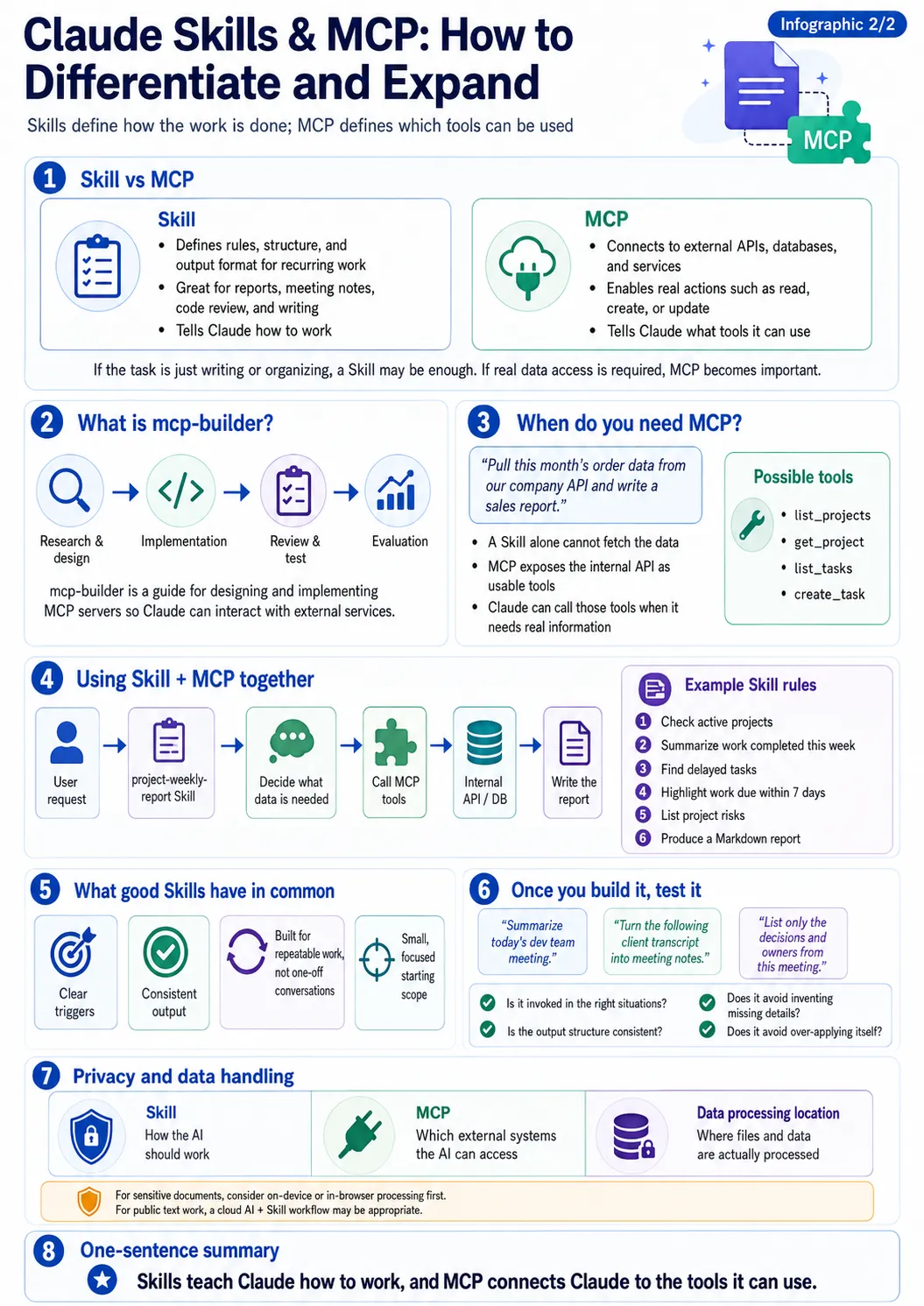
A Skill is a work manual telling AI 'how to work,' while MCP is closer to a conduit connecting AI to external systems.
Skills alone are enough to handle tasks like document organization or writing. However, requests like this tell a different story:
Fetch this month's order history from our company API
and write a revenue report.
If Claude has no way to access the company API, no matter how great your Skill is, it cannot retrieve the data. This is when MCP is needed. Simplified structure:
User
 ↓
Claude
 ↓
Skill
("Revenue reports are written like this")
 ↓
MCP
("Fetches required data from company systems")
 ↓
Internal API / DB / External Service
In other words:
A Skill defines how a task is done, whereas MCP connects the actual tools and data.
mcp-builder — How to Connect Claude and External Services
Anthropic's official Skills repository also includes a Skill called mcp-builder.
mcp-builder is a development guide you can use when designing and implementing MCP servers.
Its current official description guides you in creating tools so that LLMs can interact with external APIs or services through an MCP server, covering implementations based on Python and TypeScript. (GitHub)
The overall flow is also relatively clear:
Research and Design
 ↓
Implementation
 ↓
Review and Testing
 ↓
Evaluation
The official mcp-builder also explains the MCP server building process largely across these stages: Research & Planning → Implementation → Review & Testing → Evaluation. (GitHub)
When Is MCP Actually Needed?
Suppose your company uses an internal project management API with functions like these:
GET /projects
GET /projects/{id}
GET /tasks
POST /tasks
You want to make this request to Claude:
Check the currently ongoing projects and
organize only the tasks with deadlines within a week.
An MCP server can connect your internal API into tool formats that Claude can use. Conceptually, tools like these can be created:
list_projects
get_project
list_tasks
create_task
Claude can use these tools to query real data whenever necessary. Combining this with a Skill takes it a step further.
Using Skills and MCP Together
Suppose you have a Skill named project-weekly-report.
The Skill contains rules like these:
1. Check ongoing projects.
2. Summarize tasks completed this week.
3. Identify delayed tasks.
4. Highlight tasks with deadlines within 7 days.
5. Summarize risk factors by project.
6. Write a Markdown report.
And the MCP has these tools connected:
list_projects
list_tasks
get_task
Now, the user only needs to make a simple request:
Make this week's project report.
Conceptually, the flow looks like this:
User Request
      ↓
project-weekly-report Skill
      ↓
Determine required data
      ↓
Call MCP Tool
      ↓
Internal Project API
      ↓
Return Data
      ↓
Generate report according to Skill rules
This is where automation becomes much more interesting. It moves beyond simply making AI write text into a structure where AI directly fetches necessary data, processes it according to established work procedures, and produces the final result.
Good Skills Share Common Traits
As you create Skills, you ultimately come back to a few principles.
Triggers Must Be Clear
It is best to clearly state when a Skill should be used in its description.
Rather than:
description: Processes data.
Writing something like this is better:
description: Analyzes CSV sales data and writes monthly revenue reports. Use this when the user requests sales CSVs, monthly sales analysis, sales reports, or sales trend analysis.
Results Must Be Consistent
One of the main reasons to use a Skill is to reduce inconsistencies in output formatting. If tables should be used, define the table structure; if report order matters, explicitly state the sequence.
Target Repetitive Tasks, Not One-Off Conversations
Rather than a one-time task like:
Write a report to send to Manager Kim on July 17th.
Tasks that can be reused repeatedly, such as:
Write weekly project reports.
fit Skills much better.
Start Small
You don't need to build a 500-line SKILL.md from the start.
It is much easier to manage if you turn a single instruction you frequently use into a Skill and gradually add necessary rules as you use it.
Test Your Skill Once Built
Finishing the Skill files doesn't mean you're done. It's important to actually run similar prompts multiple times. For example, for a meeting minutes Skill, you can run tests like these:
Test 1:
Summarize today's development team meeting.

Test 2:
Turn the customer meeting transcript below into meeting minutes.

Test 3:
Organize only the decisions made and assignees from this meeting.
What you need to check is simple:
- Does the Skill trigger properly in needed situations?
- Is the output structure consistent?
- Does the AI invent things randomly that you didn't specify?
- Does the Skill fire even in situations where it shouldn't?
If problems are found, modify the description or guidelines.
This Write → Test → Refine cycle is quite important for building good Skills.
In fact, Anthropic's current skill-creator also supports creating test prompts, comparing results with and without the Skill applied, and iteratively improving them. (GitHub)
Personal Information Still Needs Consideration Even When Making Skills
Just because a Skill automates repetitive tasks doesn't mean your data...