Guides
ガイド
ブラウザ上でファイルを安全に扱うための実践的なガイドとインサイト。各記事から直接ツールへアクセスできます。
Resize an Image to Exact Pixels — Set the Width and Height You Need
How to fit a photo to a required pixel size — ID photo specs, shop thumbnails, upload limits. Shrink without distortion using the ratio lock, and handle specs like 300×400 with crop plus resize. In the browser, no upload.

How to Create a QR Code That Never Expires (Free, Print-Ready)
Turn a link or text into a QR code. It's a static QR — the content lives in the code itself — so it never expires, and what you type is never sent to a server.
How to Convert iPhone HEIC Photos to JPG (When They Won't Open on Windows)
iPhone photos arriving as HEIC and refusing to open? Convert them to JPG or PNG — dozens at once, inside your browser, without uploading them anywhere.
How to Make an ID Photo from a Selfie — Sized and Background-Ready
Turn a phone photo into a properly sized ID photo — background removed and replaced with a standard color, cropped to spec, and your face photo never leaves your device.
How to Make a Korean Name Stamp (Dojang) Image — Transparent PNG
Create a traditional-style name stamp image for documents — Korean or Hanja characters, six typefaces, round or square, with a realistic ink texture. Saved as a transparent PNG.
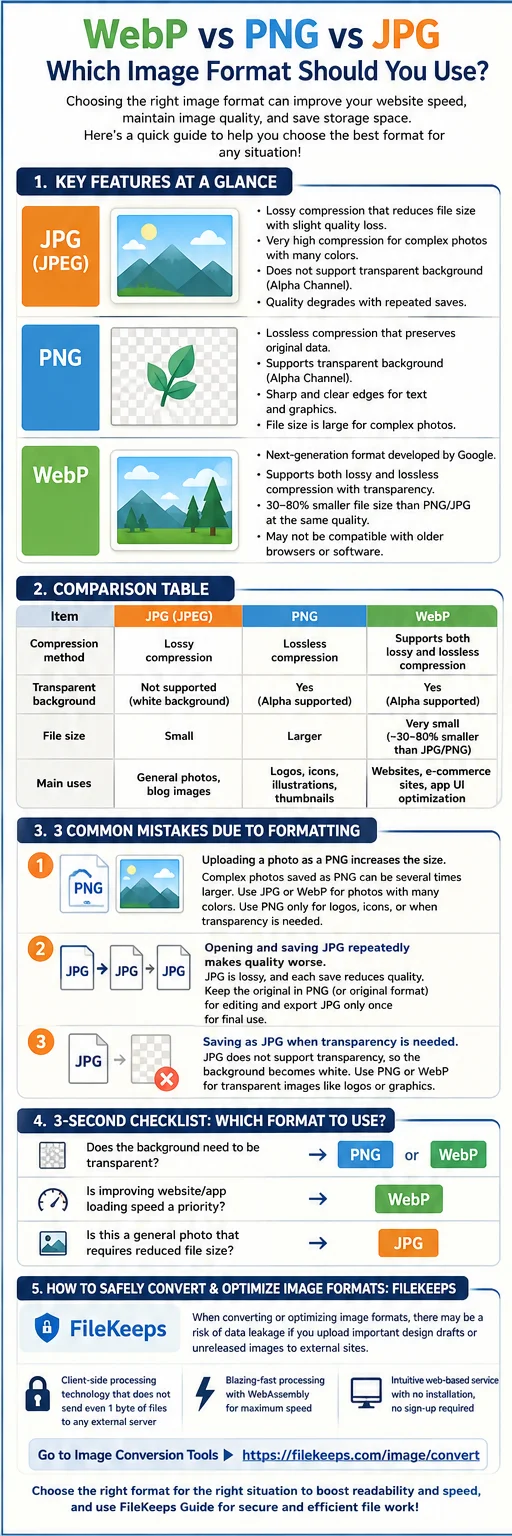
The Complete Guide to Image Formats: WebP, PNG, and JPG Differences and How to Use Each in Practice
How the three main web image formats differ and how to pick the best one for each situation—plus a way to convert them right in your browser.
How to Remove an Image Background — With AI, In Your Browser, No Upload
How to remove the background from portrait or product photos with AI and save them as transparent PNGs — processed inside your browser, with no upload.
Convert Dozens of Images at Once (as a ZIP, In Your Browser)
How to convert many images to another format at once, shrink their size, and download them as a ZIP — with parallel processing and resume, all inside the browser.