What is On-Device AI? How to Process PDF Summaries and Speech-to-Text Locally on Your PC
Understand the pros and cons of on-device AI running AI models directly inside your browser via WebGPU and WebAssembly.
Using AI to summarize PDF files or convert audio files into text has now become very common.
However, not many people think about how AI actually processes these files.
Most people imagine a structure like this:
"Isn't it a method where you upload a file to an AI server, the server analyzes it, and then sends back the results?"
In fact, many AI services operate this way. When a user uploads a PDF, image, or audio file to a server, the server's AI model analyzes the file and passes the results back.
Recently, however, a different type of AI technology has been drawing attention.
That is On-device AI.
Simply put, On-device AI is a method where you run AI directly inside your PC or browser without sending files to an external server.
Interest in this is growing, especially for tasks that may involve personal information, such as PDF summaries, document analysis, OCR, translation, and speech-to-text conversion.
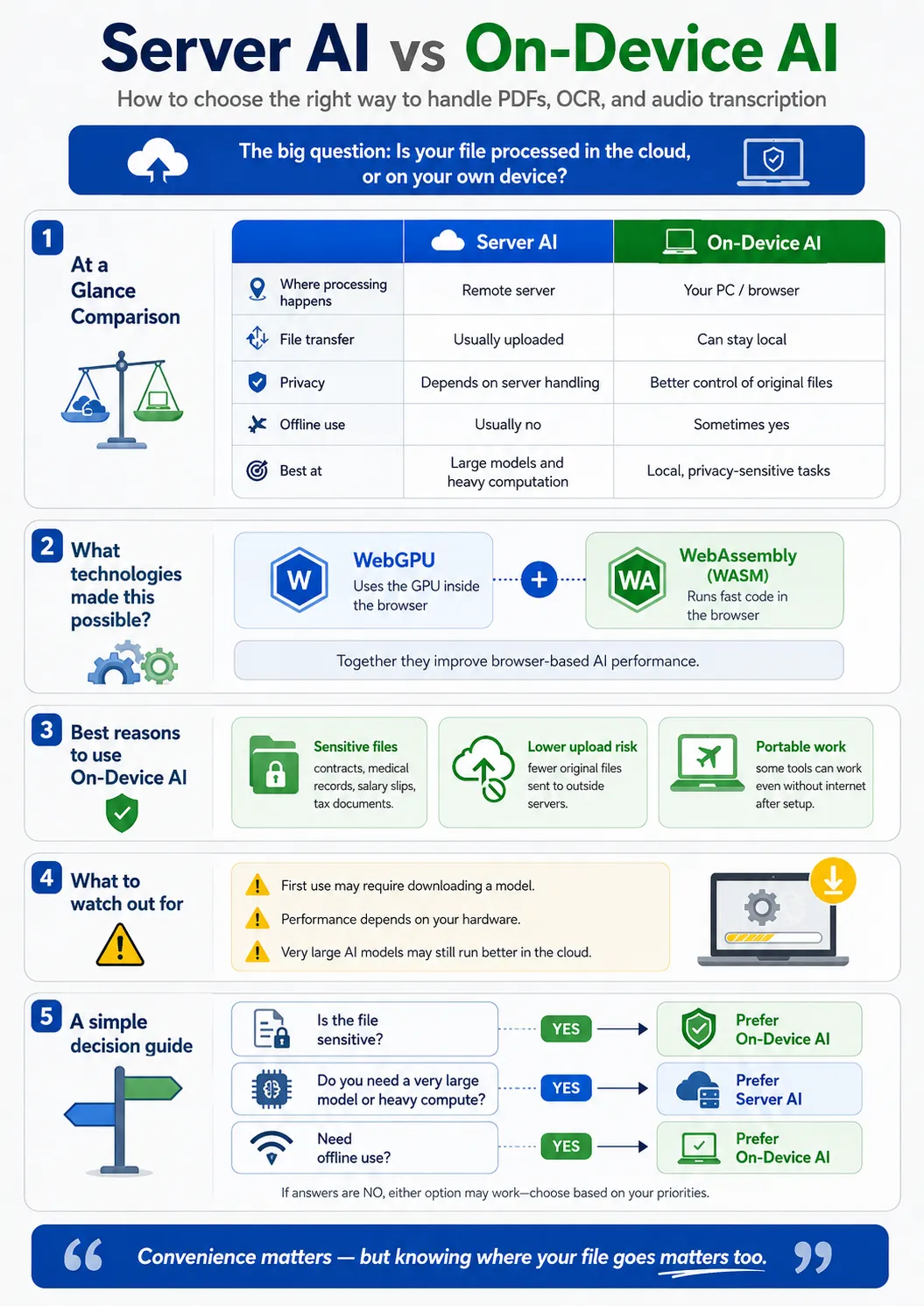
What is On-device AI?
On-device AI is a technology where AI computations are handled directly on the user's device rather than on a cloud server. In other words, your files stay right on your computer while only the AI model runs in your browser or PC. For example, imagine you want to summarize a contract received from your company. In a typical server-based AI, the process goes like this: Upload contract → Send to server → AI analysis on the server → Return summary result On the other hand, On-device AI processes it like this: Select contract → AI analysis on my PC → Display summary result The biggest difference is whether the original file is transmitted to an external server. This difference becomes even more crucial when handling files that you are hesitant to send externally, such as contracts, hospital medical records, pay stubs, tax documents, and personal journals.
Differences Between Server-based AI and On-device AI
Server-based AI has the advantage of running large-scale AI models quickly because computations are performed on powerful servers. However, it often requires files to be transmitted to an external server. On-device AI performs computations directly on the user's computer. Therefore, it can implement features like PDF summarization, OCR, translation, and speech recognition without uploading files to a server. The core differences between the two methods are as follows: Server-based AI Files are uploaded to a server and processed by the server's AI. On-device AI Files remain on your device and are processed using your PC's CPU or GPU. It is difficult to say that one method is unconditionally better. What matters is choosing the appropriate method based on your purpose of use.
Why AI Runs in the Browser
In the past, it was not easy to run AI directly inside a web browser. This is because AI models require a lot of computations, necessitating high-performance GPU servers. However, as browser technology and computer performance have advanced recently, the situation has changed significantly. Representative technologies for this are WebGPU and WebAssembly (WASM).
What is WebGPU?
WebGPU is a technology that allows web browsers to utilize a computer's GPU. GPUs were originally used mainly for gaming, graphics processing, and video editing. However, because GPUs are extremely good at processing many computations simultaneously and rapidly, they are also well-suited for AI calculations. Using WebGPU allows browsers to leverage the GPU, significantly increasing the execution speed of AI models. Through this, browsers can handle tasks such as: PDF document analysis, AI document summarization, image processing, translation, speech recognition, and OCR. In other words, an environment is being created where you can run AI functions directly in your web browser without installing a separate program.
What is WebAssembly (WASM)?
WebAssembly, or WASM for short, is a technology created to run high-performance programs in browsers. Traditional web browsers primarily executed programs using JavaScript. However, with the advent of WebAssembly, programs developed in languages like C, C++, and Rust can now run with high performance right inside the browser. Thanks to this technology, complex calculations that were once only possible in desktop programs can now be handled within web browsers. AI models can also be executed directly inside the browser using WebAssembly.
What Happens When You Use WebGPU and WebAssembly Together?
By utilizing WebGPU and WebAssembly together, you can drastically boost the performance of browser-based AI. WebAssembly can handle program execution, while WebGPU can utilize GPU operations to accelerate AI calculation speeds. Through this, you can implement AI functions in the browser such as: PDF summarization, document analysis, OCR character recognition, translation, speech recognition, and speech-to-text conversion. The most important point is that even while performing these tasks, you can create a structure where original files are not sent to a server. The files stay on your computer, and the AI processes the tasks using your device's CPU and GPU.
Advantage 1 of On-device AI: Privacy Protection
The biggest advantage of On-device AI is privacy protection. For example, imagine processing documents such as the following with AI: Contracts, hospital medical records, family relation certificates, pay stubs, tax-related documents, personal journals, etc. These documents may contain sensitive personal information such as names, addresses, contact numbers, account information, and patient data. In the server upload method, files are transmitted to an external server. In contrast, On-device AI processes files within your device, reducing the external transmission of original files. Of course, On-device AI does not automatically solve all privacy issues. Since websites may still separately collect cookies, usage statistics, and analytical data, it is a good idea to check the privacy policy as well. However, the fact that document files themselves are not sent to an external server can make a major difference in terms of privacy protection.
Advantage 2 of On-device AI: Reduced AI Service Operating Costs
In typical AI services, servers perform calculations on behalf of the users. As the number of users grows, GPU server usage increases and server operating costs rise as well. With On-device AI, conversely, the user's computer performs the calculations directly. Therefore, service providers can reduce the AI server computation costs they have to bear. Because of this, some On-device AI services can offer their services at relatively low costs or expand free features.
Advantage 3 of On-device AI: Offline AI Usage
On-device AI can be structured to be usable even without an internet connection. Once you download the AI model for the first time and store it on your device, you can often run it without an internet connection afterward. For example, even if your internet connection is unstable on a plane or during an overseas business trip, you can still use PDF summaries or speech-to-text conversion. Of course, depending on the service, an internet connection may still be needed for login, authentication, and checking for updates. However, being able to process the core AI calculations themselves offline is a significant advantage of On-device AI.
There Are Also Disadvantages to On-device AI
On-device AI is not better than server-based AI in every situation. It also has a few limitations.
It May Take Time When First Run
On-device AI often requires downloading the AI model when it is first run. Depending on the model size, you might need to download hundreds of megabytes to several gigabytes of data. Therefore, loading times can be long when first used. However, once the model is saved in the browser cache or PC, you usually do not need to download it again.
Speed Varies Depending on Computer Performance
On-device AI performs calculations directly on the user's PC. Consequently, AI processing speed can vary depending on the performance of the CPU, GPU, and memory. Tasks that run quickly on a modern laptop or a PC with a dedicated GPU may take much longer on an older computer.
Large AI Models May Benefit from Server Methods
Very large AI models are often still more efficient when run on cloud servers. AI models with billions or tens of billions of parameters require massive amounts of GPU memory and computational power. It can be difficult to run such large models quickly on a typical personal PC. Therefore, On-device AI currently shows particular strength in relatively lightweight AI tasks such as PDF summarization, translation, OCR, speech recognition, and speech-to-text conversion.
Can You Summarize PDFs Without a Server?
Yes, it is possible. By extracting text from a PDF file and passing it to an AI model running in the browser, you can summarize the document's contents. In this case, you can work without uploading the PDF file itself to an external server. This method can be especially useful for documents where external transmission is burdensome, such as contracts, internal reports, and research materials.
Can Audio Files Be Converted to Text Without Uploading Them to a Server?
This is also possible. By running a speech recognition AI model directly in your browser or PC, you can convert recording files into text without uploading them to a server. On-device speech recognition can be useful when processing files that may contain personal information or confidential content, such as meeting recordings, interviews, and personal voice memos.
In the AI Era, You Must Check "Where It Is Processed"
Going forward, AI will process even more files and data. Tasks that previously required separate programs—such as PDF document summarization, translation, OCR, and speech-to-text conversion—can now be easily handled using AI. However, simply checking the features when using AI may no longer be enough. Now, there is one more thing you need to check: "Where is my file being processed?" Depending on whether it is processed on a server or on your computer, your privacy protection approach can change drastically. Especially if you frequently handle sensitive files such as contracts, medical records, tax documents, and payroll data, it is a good idea to check whether the AI service you are using employs a server-upload method or an On-device AI method. You do not need to give up the convenience of AI. The key is to choose the appropriate AI processing method based on the nature of your files. You can use a split approach: process sensitive documents within your device whenever possible, and utilize server-based AI for tasks that require massive computation. When choosing AI services in the future, not only features and speed, but also where files are processed, whether they are sent to a server, and whether On-device AI is supported will become important criteria.
FileKeeps provides a fallback where, for browsers that do not support WebGPU, text is briefly sent to an edge server only with the user's consent. Even in this case, the file itself is never transmitted.
Summarize documents and ask questions with On-device AI. Open AI File Analysis →