What are Claude Skills? A Smarter Way to Delegate Repetitive Tasks to AI
How to assign specialized skills to AI for consistent results without repeating instructions every time, covering Claude Skills, practical use cases, and privacy.
If you use AI frequently for work, at some point you realize you keep typing the same phrases over and over again.
"Write this in this format." "Explain technical terms simply." "State the conclusion first and put a summary at the end." "Write it in the same style as last time."
If it's only once or twice, it’s no big deal. However, once you start writing similar documents every day, answering customer inquiries, or organizing meeting minutes, things change. Copying and pasting the same instructions every time becomes another repetitive chore in itself. Claude Skills can be seen as a way to reduce precisely this kind of repetition. To put it simply,
It means taking the working methods you used to explain to the AI every single time, turning them into a kind of "work manual," and reusing them whenever needed.
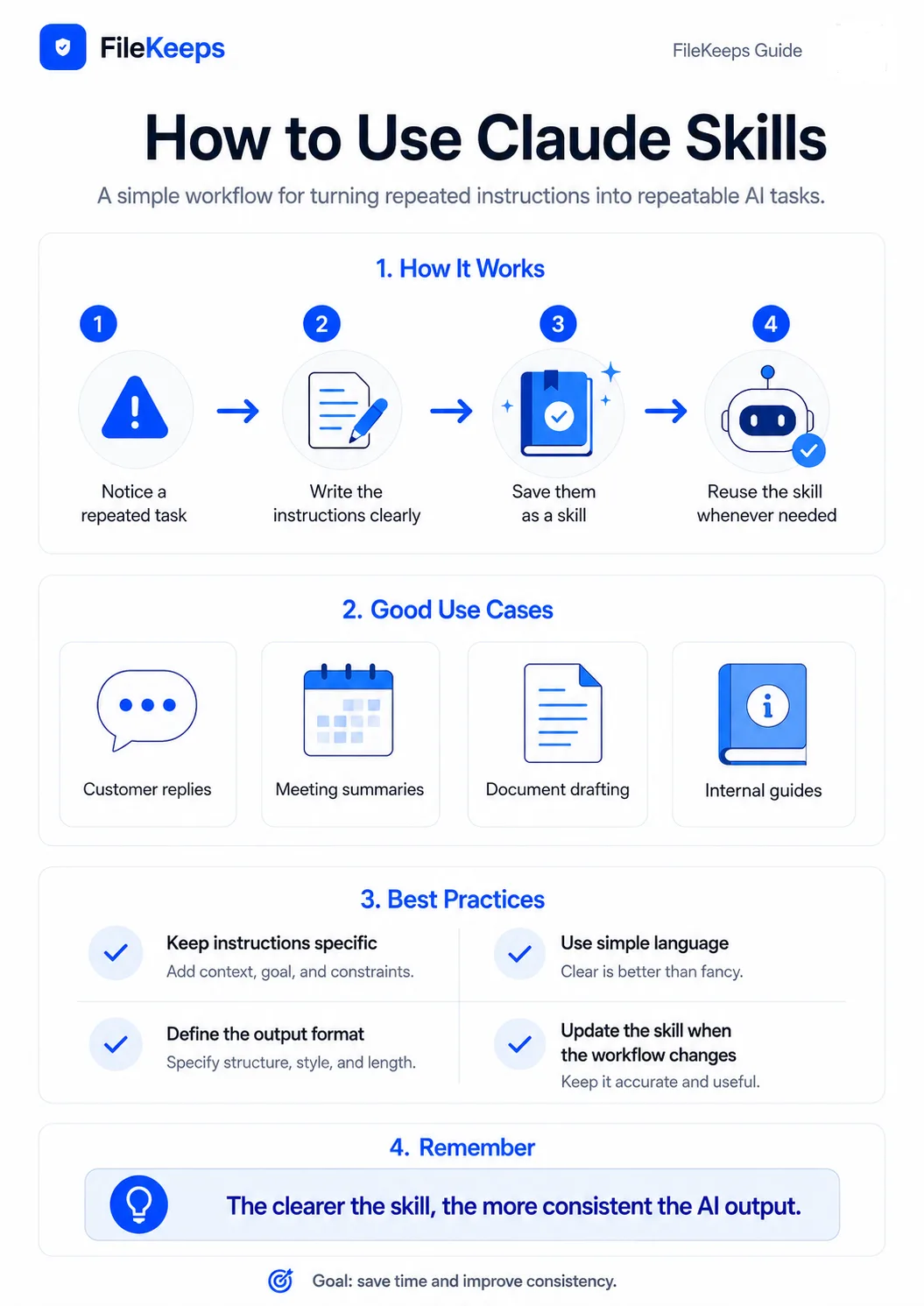
What Are Claude Skills?
You don't need to overthink Claude Skills. It's easy to understand them as a bundle of instructions, rules, examples, and reference materials needed to perform a specific task well. For instance, let’s say you organize weekly meeting minutes at your company. Normally, you might ask Claude something like this:
Please organize the following meeting contents.

- First, organize the key decisions.
- Indicate the person in charge and the deadline.
- Separate any undecided matters.
- Keep sentences short.
- At the end, summarize what needs to be checked before the next meeting.
The problem is that you have to type the same thing again next week. And the week after that, too. If you organize rules like this into a Skill, rather than repeating long explanations every time, you can focus on making requests based on the actual meeting content.
The Core of Skills Is Not Making AI Smarter
When you first hear the term Claude Skills, it might feel like a feature that adds new capabilities to the AI. However, from a business perspective, it’s better to understand it a bit differently. The important value of Skills lies not in increasing the AI's intelligence itself, but in reducing variance in the output. For example, let’s say three employees asked Claude to write a response to the same customer inquiry. Without separate criteria, the results might look like this:
- Employee A's response could be overly friendly,
- Employee B's response could be too stiff, and
- Employee C's response could end up longer than necessary.
None of these are necessarily wrong answers. However, from the company's perspective, it's not ideal for the message delivered to customers to vary wildly depending on the person. In this case, if you organize customer support criteria into a Skill, anyone who uses it can apply roughly the same principles. Ultimately, the advantage of Skills can be expressed as:
"Making the AI do something well once" vs. "Making it do things consistently well every time"
Why Are Claude Skills Useful?
1. You Don't Have to Explain the Same Thing Every Time
The longer someone uses AI, the longer their personal prompts tend to get. It usually starts simple:
Please write this text naturally.
A little later, the requirements pile up:
Please write this text naturally.

- Include core keywords in the title.
- Don't make it sound too much like an ad.
- Explain technical terms simply.
- Use an H2, H3 structure.
- Include one real-world example.
- Add a conclusion at the end.
As you keep using it, this prompt turns into a small work manual. If that's the case, it’s much more efficient to turn it into a reusable rule rather than copying and pasting it every time.
2. It's Easy to Maintain a Consistent Output Format
Take reports as an example. Suppose the weekly report format used in your company looks like this:
# This Week's Key Achievements

# Key Metrics

# Current Issues

# Next Week's Plans

# Items Requiring Attention
If you let employees freely ask AI to write reports, the headings or order might vary slightly each time. However, if you pre-define these structures and writing criteria, it becomes much easier to maintain a consistent output format. It also reduces the problem of humans accidentally omitting some of the instructions.
3. You Can Standardize How a Team Uses AI
While convenient for personal use, Skills are especially useful in environments where multiple people work together. For instance, suppose several employees at a company write product introduction posts. Without writing standards, differences like these can occur:
- They might refer to product names differently,
- They might use technical terms inconsistently,
- Someone might use overly promotional expressions, or
- Someone might omit important features.
In such cases, you can establish guidelines like the following as a single set of work rules:
Product Introduction Writing Criteria

- Do not write about unverified features.
- Avoid exaggerated expressions like "perfect," "guaranteed," or "100%."
- Explain technical terms simply when they first appear.
- When explaining privacy features, provide the rationale together.
- Do not make paragraphs excessively long.
This helps keep the basic direction of the output consistent, regardless of who is using the AI.
Where Can Claude Skills Actually Be Used?
There are more tasks suited for Skills than you might think. They are particularly effective for rule-based and repetitive tasks. Let's look at a few examples.
Example 1. Customer Support Inquiries
When running a service, you constantly receive similar questions. For example, questions like:
Is the file I uploaded stored on the server?
At this point, you can pre-define the company's customer response criteria:
Customer Inquiry Response Criteria

1. Directly answer the customer's question first.
2. Explain difficult technical terms in simple language.
3. Do not guess or state unverified information.
4. Do not exaggerate expressions related to privacy.
5. If there is a way for the user to check for themselves, guide them to it.
6. Keep responses concise and focused on necessary content.
From then on, simply passing along the actual customer's question can help you generate responses adhering to a consistent standard.
Example 2. Writing SEO Blog Posts
If you consistently run a blog, you develop rules that you repeatedly use when writing posts. For example:
SEO Blog Writing Criteria

- Naturally include core search keywords in the title.
- Present the problem the reader is curious about early on.
- Use H2 and H3 tags to organize content.
- Explain technical terms simply.
- Include real-world use cases.
- Avoid excessive keyword repetition.
- Prioritize delivering information over advertising.
- Naturally summarize key points at the end.
If you repeatedly utilize these criteria, next time you can simply make requests focused on the topic:
Topic: On-device AI and Privacy Protection
This cuts down the time spent re-explaining long style guidelines every time.
Example 3. Organizing Meeting Minutes
Using AI to organize meeting transcripts is also a task that pairs well with Skills. For instance, let’s say you always format meeting minutes like this:
# Meeting Purpose

# Key Discussions

# Decisions Made

# Person in Charge and Deadline

# Pending Issues

# Items to Check Before the Next Meeting
By pre-creating this structure and organization criteria, it becomes easy to format the results consistently every time a meeting ends. Especially for organizations with many meetings, this small difference can yield significant time savings over time.
Example 4. Developer Code Reviews
Skills are not a concept limited to document writing. They are also well-suited for tasks that require repeatedly applying consistent standards, such as code reviews. For example, suppose you always check the following items during code reviews in a C# project:
C# Code Review Criteria

- Check for potential NullReferenceExceptions
- Check async/await usage patterns
- Check whether IDisposable objects are properly disposed
- Check for unnecessary repeated LINQ execution
- Check exception handling methods
- Suggest refactoring methods if methods are overly long
- Explain causes and improvement methods if performance issues are anticipated
- Provide example code when modifications are needed
Having these criteria in place allows developers to submit code and get reviews based on the exact same standards. It is especially helpful for aligning code review standards when multiple developers are working on the same project.
Example 5. Document Review
You can also use this when your company repeatedly reviews contracts, proposals, or internal reports. For example, document review criteria can be structured like this:
Document Review Criteria

- Verify that dates and monetary amounts match across the document.
- Check that person-in-charge names or company names are spelled correctly.
- Look for contradictory sentences.
- Highlight sections where important conditions are expressed ambiguously.
- Check if personal information is included unnecessarily.
- Separate and organize parts that require verification.
Since tasks like this require checking fixed items without omission rather than creative writing, they fit the Skill approach particularly well.
What Kinds of Tasks Make Good Skills?
Not every prompt needs to be made into a Skill. If it’s a question you’ll only ask once, it’s faster to just ask Claude directly. Instead, asking yourself this question makes it easy to judge:
"Am I repeatedly typing this explanation to the AI over and over?"
If so, it is likely a strong candidate for a Skill. Representative tasks include:
- Customer inquiry responses
- Weekly and monthly report writing
- Meeting minutes organization
- SEO blog writing
- Translation style unification
- Document review
- Code reviews
- Product description writing
- Email drafting
- Summarizing data analysis results
- Internal company document writing
- Organizing repetitive research results
They all share one common trait: The input content changes every time, but the processing method remains similar.
General Prompts vs. Claude Skills
Comparing the two makes them easier to understand:
| Category | General Prompt | Claude Skills |
|---|---|---|
| Purpose | Current task instruction | Defining repetitive work methods |
| Rules | Typed whenever needed | Pre-organized and reused |
| Usage | Convenient for one-off questions | Advantageous for repetitive work |
| Output Format | May vary with each conversation | Easy to keep consistent |
| Team Usage | Prompts can vary by user | Great for establishing common standards |
Simply put, If a prompt is "instructions on what to do today," a Skill is closer to "a work manual detailing how to do that job."
How Do You Make a Good Skill?
You don't need to make it complicated from the start. It’s best to write it thinking of it as a work manual that is easy for a human to understand as well. For example, you can start with a structure like this:
# Role

Act as a customer support representative for a SaaS service.

# Purpose

Answer user questions accurately and in an easy-to-understand manner.

# Basic Rules

- Do not guess unverified information.
- Explain technical terms as simply as possible.
- Do not unnecessarily repeat personal information entered by the customer.
- If an issue is not resolved, guide the user on how to verify it further.

# Response Format

1. Direct answer to the question
2. Explanation of the reason or cause
3. Solution method
4. Additional verification methods if necessary

# Good Response Example

User:
Is my file stored on the server?

Response:
File processing methods may vary depending on the feature you use.
If it is a feature where files are processed within your device,
you can work without transmitting the original files to the server.
The important thing here is not just writing rules, but including actual examples together. When teaching work to a person, showing real cases is easier to understand than just giving explanations. The same goes for AI.
You Don't Need to Make Skills Overly Complex
A common mistake when first making Skills is trying to handle every single situation at once by stuffing in too many rules. For instance, putting all of the following functions into a single Skill:
- Blog writing
- Email writing
- Customer service
- Translation
- Code review
- Report writing
...will actually make it confusing to figure out which rules apply and when. Whenever possible, it’s better to separate purposes. For example, you can split them like this:
customer-support
seo-blog-writer
meeting-summary
csharp-code-review
document-review
It is best to name your Skills so that just looking at the name makes it obvious what task they handle.
Be Cautious When Including Personal or Confidential Information
When automating repetitive tasks, you might be tempted to put a lot of information into a Skill. However, it's best to separate work rules from sensitive data. In particular, information such as the following should be handled with care:
- Passwords
- API Secret Keys
- Actual customer personal information
- Resident registration / ID numbers
- Account information
- Medical information
- Undisclosed contract information
- Internal company authentication credentials
For example, when creating a customer support Skill, rather than storing actual customer data, it is much better to include rules for handling personal information like this:
- Use customer names only when necessary.
- Do not repeatedly display phone numbers and addresses in the response.
- If a resident registration number or account number is entered, do not output it as-is.
- If sensitive information is included, utilize only the necessary parts.
While convenience in AI automation is important, the habit of checking what information is stored and processed where remains essential.
Characteristics of Tasks Where Claude Skills Excel
Tasks that are well-suited for Skills share common characteristics:
Inputs vary
        ↓
Processing methods are similar
        ↓
Output formats are somewhat standardized
For example, meeting contents are always different. However, the organization method can always follow the same sequence: Meeting Purpose → Key Discussions → Decisions Made → Person in Charge → Next Steps. Customer questions are likewise always different, but the basic flow of: Understand Question → Direct Answer → Explain Reasons → Solution Method repeats itself. Thus, tasks where the content changes but the processing flow repeats are particularly well-suited for Skills.
Ultimately, Claude Skills Are a Way to Teach AI "Our Way of Working"
When you start using AI, knowing how to ask good questions is what matters most at first. That's why many people focus on crafting good prompts. However, once you use AI for actual work over a long period, other problems start to show: "How can I stop having to explain the same thing every time?" "How can I keep the results from differing from person to person?" "How can I standardize the way our team uses AI?" Claude Skills can be seen as one of the ways to solve these problems. Getting a great single answer from AI might be less important than consistently getting similar quality results in your actual work. And the start of that is surprisingly simple. Take a look at the prompts you usually keep pasting into Claude. There is a high probability that a small work manual you've already created is hidden inside them. Organizing those repetitive explanations and making them reusable. That is the easiest way to understand Claude Skills.
FileKeeps' AI File Analysis summarizes and queries documents within your browser without sending them to a server. Handling sensitive documents this way while using cloud AI for the rest — this combination is the realistic answer.